Verilerinizin her zaman elinizin altında olmasını sağlayın
Kısacası Keyturion PRO, kendi özel alanınıza sahip Keyturion'dur (sunucumuzda bir hesap), bu da size favori tarayıcınızdan ek bir yönetici web uygulamasına erişim sağlar ve izlenen bilgisayarların uzaktan yapılandırılmasına izin verir. Tek bir bilgisayarda veya birden fazla uç noktada eşit derecede iyi çalışır.
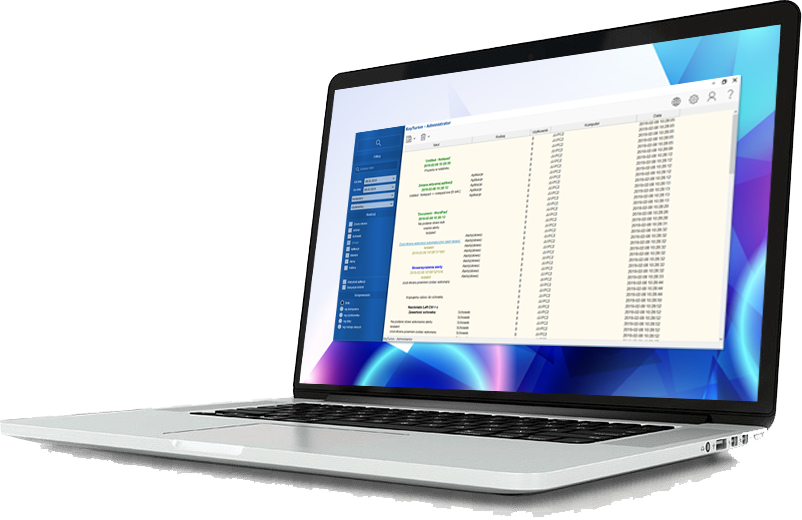

Keyturion PRO ne için kullanılabilir?
Keyturion PRO, topladıkları verilere sürekli ve kesintisiz erişim isteyen kullanıcılar için ideal bir çözümdür. Ayrıca hesap ayarlarını uzaktan yapma esnekliği sunarak kontrol ve rahatlığa önem verenler için mükemmeldir.
İster tek bir bilgisayarı ister birden fazla makineyi izleyin, Keyturion PRO kapsamlı veri toplama ve yönetimi sunarak her türlü kurulumda güvenilir gözetim sağlar.
| Tüm veriler bir bulut sunucusunda depolanarak izlenen bilgisayarda yer kaplamaması sağlanır. Bu, büyük miktarda verinin verimli bir şekilde depolanmasını sağlar. | |
| Birden fazla bilgisayardan alınan verileri yönetmenizi ve analiz etmenizi sağlar. |
| Keyturion uygulamasının uzaktan yapılandırılmasını sağlar. | |
| Şifreleme yoluyla tam gizlilik sağlar. Erişim yalnızca özel bir anahtar aracılığıyla sağlanır ve yetkisiz herhangi bir varlığın depolanan verilere erişmesini önler. |
Verilerinizin Depolanmasındaki Temel Fark
| Keyturion | Keyturion PRO |
| Kaydedilen verileri belirtilen bir e-posta adresine gönderir. | Kaydedilen verileri belirlenen bir bulut sunucusuna gönderir. |
| Verileri ek olarak veya e-posta içeriğinde gönderirken sağlayıcı sınırlamalarıyla karşılaşabilir. | Metin veya ekran görüntüsü verilerinde sınır yok. Bulutta güvenli bir şekilde saklanır - örneğin, günde binlerce ekran görüntüsü ve birkaç ay boyunca yüz binlerce ekran görüntüsü bile. |
| Uzaktan yapılandırmaya izin vermez. | İzlenen bilgisayarların uzaktan yapılandırılmasını sağlar. |
| Veri tarama yalnızca bir bilgisayar için uygundur. | Verileri aynı anda birden fazla bilgisayar için güvenli bir şekilde depolar ve izlenen tüm cihazlarda rahatça gezinmeye ve kategorilere ayırmaya olanak tanır. |
Çalışanlarınızın Üretkenliğini Sağlayın
Keyturion Çalışan Verimliliği İzleme Yazılımı, çalışanlarınızın işlerine odaklanmalarını ve görevlerini yerine getirmelerini sağlamanıza yardımcı olur. İşle ilgili faaliyetlere ne kadar zaman ayırdıklarını ve sosyal medyada gezinmek veya özel mesajlaşma platformlarını kullanmak gibi kişisel kullanım için ne kadar zaman harcadıklarını gösterir.

Herhangi bir sorunuz var mı?
Daha fazla yardıma mı ihtiyacınız var?
Hangi sürümün sizin için doğru olduğundan emin değil misiniz?
Teknik sorulara yanıt mı arıyorsunuz?
Özelleştirilmiş, kişiselleştirilmiş hizmetlerle ilgileniyor musunuz?

Computer Monitoring Software – Advanced Employee Tracking & Parental Control Solution
Our bilgisayar izleme yazılımı is a comprehensive, next-generation solution designed for businesses, parents, and educators who need complete visibility and control over how computers are used. Built with modern security standards and ethical monitoring principles, this powerful platform offers real-time insights, detailed activity logs, intelligent reporting tools, and automated alerts that help organizations improve productivity and help families create a safer digital environment for children.
Whether you manage a remote workforce, supervise an office team, or want to guide your child’s online behavior, our bilgisayar izleme yazılımı provides the precision, transparency, and reliability you need to make informed decisions.
A Complete Employee Monitoring Solution for Modern Workplaces
Businesses face increasing challenges related to productivity, data security, and compliance. Our bilgisayar izleme yazılımı enables companies to track how employees use corporate devices without interrupting workflows. With real-time data, user-friendly dashboards, and customizable monitoring policies, employers can better understand performance trends and optimize internal processes.
Key Features for Employee Monitoring
1. Real-Time Activity Tracking
Monitor active windows, running applications, keyboard activity, and time spent on each task. This helps managers identify productivity bottlenecks and ensure that company resources are being used responsibly.
2. Website and Application Usage Reports
Gain full visibility into which websites and applications employees use during working hours. The software highlights productive vs. unproductive activities and provides detailed timestamps, making it easier to analyze work patterns.
3. Screenshot Recording & Screen Playback
Our bilgisayar izleme yazılımı can take periodic screenshots or record continuous screen playback, offering clear visual documentation of employee activities. This feature is ideal for quality control, employee training, and internal audits.
4. Keystroke Logging (Optional & Policy-Based)
For high-security environments, optional keystroke monitoring can be enabled to protect sensitive data and detect unauthorized access attempts. All keystrokes are stored securely and can be reviewed in compliance with internal policies and legal guidelines.
5. File Transfer & Document Tracking
Track file operations such as creating, copying, renaming, printing, or deleting documents. This helps organizations prevent data leaks and maintain compliance with privacy and cybersecurity standards.
6. Productivity Analytics and Automated Reports
The platform includes AI-enhanced reporting that analyzes patterns, efficiency levels, attendance markers, and idle time. Automatic reports can be sent daily, weekly, or monthly to assist managers in evaluating team performance.
7. Cloud Dashboard for Remote Teams
Modern workplaces often rely on remote or hybrid teams. Our cloud dashboard allows administrators to monitor computers anywhere in the world, without requiring direct access to the physical device.
Powerful Parental Control Tools for Safe Digital Habits
Beyond corporate use, our bilgisayar izleme yazılımı is also a trusted parental-control solution. In a world where children are increasingly exposed to online risks such as cyberbullying, inappropriate content, and digital addiction, the software allows parents to guide their kids responsibly.
Essential Parental Control Features
1. Web Filtering & Safe Browsing
Block harmful websites, restrict adult content, and create custom whitelists or blacklists. Parents can ensure their children access only appropriate, educational online resources.
2. Screen Time Management
Set limits for daily computer usage, define allowed hours, and lock the screen automatically when time is up. This helps families promote healthy digital habits.
3. Social Media and Chat Monitoring
Track conversations on popular platforms while respecting privacy regulations. Alerts can notify parents about potential threats, bullying, or dangerous interactions.
4. Application Blocking
Prevent access to games, entertainment apps, or any software that may interfere with homework or sleep routines. Parents can schedule when certain apps are allowed.
5. Location Tracking for Laptops
If the monitored device is mobile, the software can provide approximate location tracking, helping parents locate lost or stolen laptops.
6. Email & Keyword Alerts
Create keyword-based alerts to recognize suspicious or inappropriate behaviors. When flagged phrases appear in communications, parents receive instant notifications.
Why Our Computer Monitoring Software Stands Out
✔ Easy Installation & Intuitive Interface
The setup process takes only a few minutes. The dashboard is designed for both beginners and advanced administrators.
✔ Stealth or Visible Mode
Organizations and parents can choose between transparent monitoring or discreet tracking, depending on their needs and legal requirements.
✔ Secure Cloud Storage
All records, screenshots, logs, and reports are encrypted and stored securely to ensure privacy protection.
✔ Multi-Platform Compatibility
Works on Windows, macOS, and selected Linux systems. Mobile-monitoring extensions are also available.
✔ Automated Alerts for Instant Awareness
Receive notifications about policy violations, restricted content access, or unusual user behaviors.
✔ GDPR-Friendly & Legally Compliant
The software includes tools for consent management, policy configuration, and data-handling transparency to support legal compliance in different regions.
How Computer Monitoring Software Helps Businesses Grow
Organizations that implement bilgisayar izleme yazılımı benefit from measurable improvements such as:
- Increased employee productivity
- Reduced operational costs
- Better time management and workflow optimization
- Detection of insider threats and data breaches
- Stronger compliance with industry regulations
- Enhanced transparency and accountability within teams
Whether you supervise a small business or a large enterprise, the software adapts to your structure and scales effortlessly.
How Computer Monitoring Software Supports Parents
For families, the software provides peace of mind and helps build safer digital routines:
- Protects children from online predators and harmful content
- Encourages balanced screen time
- Helps parents understand online behavior
- Supports educational development by reducing digital distractions
- Ensures device safety in case of loss or misuse
Conclusion: The Ultimate Computer Monitoring Software for Work & Home
Our bilgisayar izleme yazılımı combines advanced surveillance capabilities with user-friendly management tools, making it one of the most versatile monitoring solutions on the market. Whether you want to optimize employee productivity or protect your children from online risks, this system delivers unmatched visibility, control, and peace of mind.
With powerful features, flexible deployment options, and industry-leading security, it stands out as the ideal solution for anyone looking to take responsible control over computer usage.
