데이터를 항상 가까이에 두세요.
간단히 말해, Keyturion PRO는 전용 공간(서버의 계정)이 있는 Keyturion으로, 자주 사용하는 브라우저에서 추가 관리자 웹 애플리케이션에 액세스할 수 있으며 모니터링되는 컴퓨터를 원격으로 구성할 수 있습니다. 단일 컴퓨터 또는 여러 엔드포인트에서 똑같이 잘 작동합니다.
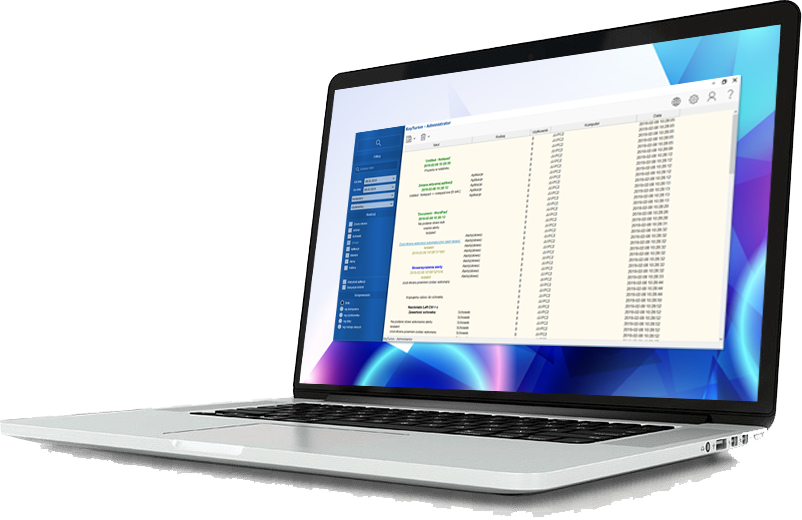

키투리온 프로는 어떤 용도로 사용할 수 있나요?
키투리온 프로는 수집된 데이터에 지속적으로 중단 없이 액세스하려는 사용자에게 이상적인 솔루션입니다. 또한 계정 설정을 원격으로 조정할 수 있는 유연성을 제공하므로 제어와 편의성을 중요하게 생각하는 사용자에게 적합합니다.
한 대의 컴퓨터를 모니터링하든 여러 대의 컴퓨터를 모니터링하든 Keyturion PRO는 포괄적인 데이터 수집 및 관리 기능을 제공하여 어떤 설정에서도 신뢰할 수 있는 감독을 보장합니다.
| 모든 데이터는 클라우드 서버에 저장되므로 모니터링되는 컴퓨터의 공간을 차지하지 않습니다. 따라서 많은 양의 데이터를 효율적으로 저장할 수 있습니다. | |
| 여러 대의 컴퓨터에서 받은 데이터를 관리하고 분석할 수 있습니다. |
| 키투리온 애플리케이션을 원격으로 구성할 수 있습니다. | |
| 암호화를 통해 완벽한 프라이버시를 보장합니다. 개인 키를 통해서만 액세스 권한이 부여되므로 권한이 없는 주체가 저장된 데이터에 액세스할 수 없습니다. |
데이터 저장의 주요 차이점
| 키투리온 | 키투리온 프로 |
| 저장된 데이터를 지정된 이메일 주소로 전송합니다. | 저장된 데이터를 지정된 클라우드 서버로 전송합니다. |
| 데이터를 첨부 파일이나 이메일 콘텐츠로 전송할 때 공급자 제한이 발생할 수 있습니다. | 텍스트 또는 스크린샷 데이터에 제한이 없습니다. 하루에 수천 장, 몇 달 동안 수십만 장의 스크린샷도 클라우드에 안전하게 저장할 수 있습니다. |
| 원격 구성을 허용하지 않습니다. | 모니터링되는 컴퓨터의 원격 구성을 허용합니다. |
| 데이터 검색은 한 대의 컴퓨터에만 적합합니다. | 여러 대의 컴퓨터에 동시에 데이터를 안전하게 저장하여 모니터링되는 모든 장치에서 편리하게 검색하고 분류할 수 있습니다. |
직원의 생산성 보장
키투리온 직원 생산성 모니터링 소프트웨어는 직원들이 업무에 집중할 수 있도록 도와줍니다. 직원들이 업무 관련 활동에 얼마나 많은 시간을 할애하는지, 소셜 미디어 검색이나 개인 메시징 플랫폼 사용과 같은 개인적인 용도로 얼마나 많은 시간을 소비하는지 보여줍니다.
질문이 있으신가요?
추가 지원이 필요하신가요?
어떤 버전이 적합한지 잘 모르시겠어요?
기술적인 질문에 대한 답변을 찾고 계신가요?
맞춤형 개인화 서비스에 관심이 있으신가요?

Computer Monitoring Software – Advanced Employee Tracking & Parental Control Solution
Our 컴퓨터 모니터링 소프트웨어 is a comprehensive, next-generation solution designed for businesses, parents, and educators who need complete visibility and control over how computers are used. Built with modern security standards and ethical monitoring principles, this powerful platform offers real-time insights, detailed activity logs, intelligent reporting tools, and automated alerts that help organizations improve productivity and help families create a safer digital environment for children.
Whether you manage a remote workforce, supervise an office team, or want to guide your child’s online behavior, our 컴퓨터 모니터링 소프트웨어 provides the precision, transparency, and reliability you need to make informed decisions.
A Complete Employee Monitoring Solution for Modern Workplaces
Businesses face increasing challenges related to productivity, data security, and compliance. Our 컴퓨터 모니터링 소프트웨어 enables companies to track how employees use corporate devices without interrupting workflows. With real-time data, user-friendly dashboards, and customizable monitoring policies, employers can better understand performance trends and optimize internal processes.
Key Features for Employee Monitoring
1. Real-Time Activity Tracking
Monitor active windows, running applications, keyboard activity, and time spent on each task. This helps managers identify productivity bottlenecks and ensure that company resources are being used responsibly.
2. Website and Application Usage Reports
Gain full visibility into which websites and applications employees use during working hours. The software highlights productive vs. unproductive activities and provides detailed timestamps, making it easier to analyze work patterns.
3. Screenshot Recording & Screen Playback
Our 컴퓨터 모니터링 소프트웨어 can take periodic screenshots or record continuous screen playback, offering clear visual documentation of employee activities. This feature is ideal for quality control, employee training, and internal audits.
4. Keystroke Logging (Optional & Policy-Based)
For high-security environments, optional keystroke monitoring can be enabled to protect sensitive data and detect unauthorized access attempts. All keystrokes are stored securely and can be reviewed in compliance with internal policies and legal guidelines.
5. File Transfer & Document Tracking
Track file operations such as creating, copying, renaming, printing, or deleting documents. This helps organizations prevent data leaks and maintain compliance with privacy and cybersecurity standards.
6. Productivity Analytics and Automated Reports
The platform includes AI-enhanced reporting that analyzes patterns, efficiency levels, attendance markers, and idle time. Automatic reports can be sent daily, weekly, or monthly to assist managers in evaluating team performance.
7. Cloud Dashboard for Remote Teams
Modern workplaces often rely on remote or hybrid teams. Our cloud dashboard allows administrators to monitor computers anywhere in the world, without requiring direct access to the physical device.
Powerful Parental Control Tools for Safe Digital Habits
Beyond corporate use, our 컴퓨터 모니터링 소프트웨어 is also a trusted parental-control solution. In a world where children are increasingly exposed to online risks such as cyberbullying, inappropriate content, and digital addiction, the software allows parents to guide their kids responsibly.
Essential Parental Control Features
1. Web Filtering & Safe Browsing
Block harmful websites, restrict adult content, and create custom whitelists or blacklists. Parents can ensure their children access only appropriate, educational online resources.
2. Screen Time Management
Set limits for daily computer usage, define allowed hours, and lock the screen automatically when time is up. This helps families promote healthy digital habits.
3. Social Media and Chat Monitoring
Track conversations on popular platforms while respecting privacy regulations. Alerts can notify parents about potential threats, bullying, or dangerous interactions.
4. Application Blocking
Prevent access to games, entertainment apps, or any software that may interfere with homework or sleep routines. Parents can schedule when certain apps are allowed.
5. Location Tracking for Laptops
If the monitored device is mobile, the software can provide approximate location tracking, helping parents locate lost or stolen laptops.
6. Email & Keyword Alerts
Create keyword-based alerts to recognize suspicious or inappropriate behaviors. When flagged phrases appear in communications, parents receive instant notifications.
Why Our Computer Monitoring Software Stands Out
✔ Easy Installation & Intuitive Interface
The setup process takes only a few minutes. The dashboard is designed for both beginners and advanced administrators.
✔ Stealth or Visible Mode
Organizations and parents can choose between transparent monitoring or discreet tracking, depending on their needs and legal requirements.
✔ Secure Cloud Storage
All records, screenshots, logs, and reports are encrypted and stored securely to ensure privacy protection.
✔ Multi-Platform Compatibility
Works on Windows, macOS, and selected Linux systems. Mobile-monitoring extensions are also available.
✔ Automated Alerts for Instant Awareness
Receive notifications about policy violations, restricted content access, or unusual user behaviors.
✔ GDPR-Friendly & Legally Compliant
The software includes tools for consent management, policy configuration, and data-handling transparency to support legal compliance in different regions.
How Computer Monitoring Software Helps Businesses Grow
Organizations that implement 컴퓨터 모니터링 소프트웨어 benefit from measurable improvements such as:
- Increased employee productivity
- Reduced operational costs
- Better time management and workflow optimization
- Detection of insider threats and data breaches
- Stronger compliance with industry regulations
- Enhanced transparency and accountability within teams
Whether you supervise a small business or a large enterprise, the software adapts to your structure and scales effortlessly.
How Computer Monitoring Software Supports Parents
For families, the software provides peace of mind and helps build safer digital routines:
- Protects children from online predators and harmful content
- Encourages balanced screen time
- Helps parents understand online behavior
- Supports educational development by reducing digital distractions
- Ensures device safety in case of loss or misuse
Conclusion: The Ultimate Computer Monitoring Software for Work & Home
Our 컴퓨터 모니터링 소프트웨어 combines advanced surveillance capabilities with user-friendly management tools, making it one of the most versatile monitoring solutions on the market. Whether you want to optimize employee productivity or protect your children from online risks, this system delivers unmatched visibility, control, and peace of mind.
With powerful features, flexible deployment options, and industry-leading security, it stands out as the ideal solution for anyone looking to take responsible control over computer usage.
